
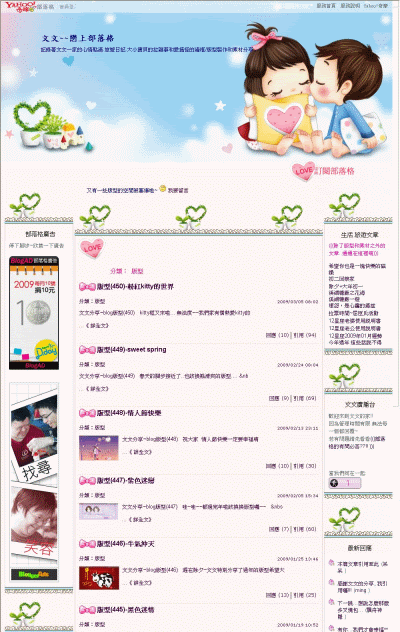
小小創意"粉粉熊熊"版型
@.序:幸福就是,妳覺得快樂的事~集合所有你覺得快樂的事~
和能讓你感到快樂的人在一起~
我想這就是人人夢寐以求的幸福園地.
瑀婈祝福每個人都能擁有一個幸福園地~
@.瑀婈加工~幸福園地版型~素材取自網路及格友分享引用.若有冒犯請告知.我會即刻處理.
 <--為了減少空間流量~所以瑀婈改用連結預覽圖片方法囉.
/*回應引用圖示*/


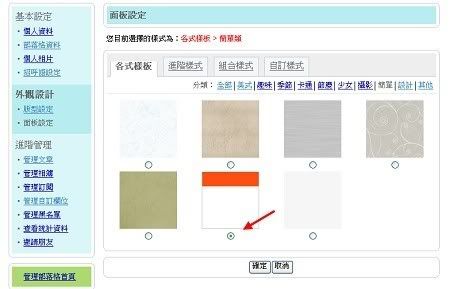
 *套用語法前..請先至管理部落格-->面版設定-->各式樣版-->將版型調至->簡單第6款->再至自訂樣式裡清除css語法->貼上版型語法*

註:請記得正確複製使用CSS語法~方能呈現美美版版唷!

瑀婈加工製品由瑀婈製作,
本文出自:
 新手如何使用版型語法以及改變自己要的文字顏色
 由於2008年7月8日奇摩部落格自訂樣式限制用語法限制置頂管理區-
->可按以下公告說明了解



 如何使用『自定樣式』增加自己想要的語法
 若格友使用版型語法有問題時請按這個教學參考
-> 部落格版型透明度的調整

這是韓網 NAVER BLOG STAR/ INDEGOM 原分享BLOG SKIN小樣


/*以下若要顯示請不要放上即可*/
/*隱藏更新日期欄*/
#ymodupdate{display:none}
/*隱藏部落格相簿*/
#ymodalbum{display:none;}
/*隱藏我要留言免受廣告干擾*/
#yblast .text a{display:none;}
/*開始囉~都可以自行調整*/
/*two col layout 二欄式版面加大寬度設定*/
.twocolga #yhtw_mastfoot, .twocoldr #yhtw_mastfoot {width:900px;margin:0 auto;}
.twocolga[class], .twocoldr[class]{min-width:900px;behavior:none;}
.twocolga .ycnt3col,.twocoldr .ycnt3col {zoom:1;width:900px;text-align:left;margin:0 auto;}
/*三欄式版面寬度設定*/
.thrcol #yhtw_mastfoot {width:970px;margin:0 auto;}
.thrcol[class]{min-width:970px;behavior:none;}
.thrcol .ycnt3col {zoom:1;width:970px;text-align:left;margin:0 auto;}
/*招呼語不放背景及文字顏色設定*/
#yblast .bg {background:transparent no-repeat;}
#yblast .text{color:#A6CF65;}
/*自訂格名及部落格描述字*/
#yblogtitle .mbd,#yblogtitle .mft{background:transparent;color:#A6CF65;padding-top:300px;text-align:center; }
#yblogtitle h1, #yblogtitle a {color: #789648; font-size:18px;font-weight:bolder;font-family:標楷體;}
#yblogtitle .tbd{height:20px }
/*HEAD背景語法-置頂不重覆部份*/
#yhtw_masthead {background:transparent;no-repeat;filter:alpha(opacity:100);background-position:center top; pacity:1.0;}
/*BODY背景語法-重覆部份*/
body {background-color:#ffffff;background-image:url(http://i240.photobucket.com/albums/ff40/tina88888888/000/s3_copy-indegom.jpg); background-repeat: no-repeat;zoom:1; filter:alpha(opacity:1.0);background-position:center top; pacity:1.0;}
/*奇摩置頂管理語法-顏色設定*/
#yhtw_masthead .mhuser div{display:inline;color:#789648;font-size:12px;}
#yhtw_masthead .mhuser div a, #xyhtw_masthead .mhuser div b{color:#789648;}#yhtw_masthead .masthead_function{font-size:12px;position:relative;}
#yhtw_masthead a,#yhtw_masthead a:link,#yhtw_masthead a:visited,#yhtw_masthead a:hover{color:#789648;}
#yhtw_masthead .masthead_function span a{color:#789648 !important;display:block;min-width:5.5em;padding:5px 4px 3px 4px;text-decoration:none;border-bottom:solid 1px #ffffff;}
#yhtw_masthead .masthead_function span a:hover{background-color:ffffff;text-decoration:underline;}
#yhtw_masthead .masthead_function strong{font-weight:normal;color:#789648;text-decoration:underline;cursor:pointer;cursor:hand;padding-bottom:5px;}
/*側欄區上標*/
.yc3sec .mhd, .yc3subbd .mhd, .yc3sec .mhd a, .yc3subbd .mhd a,.yc3sec .mhd a:link, .yc3subbd .mhd a:link,.yc3sec .mhd a:visited, .yc3subbd .mhd a:visited{ background:#ffffff; color:#789648;text-align:center;}
/*Nav module body側欄區內文*/
.yc3sec .mbd, .yc3subbd .mbd, .yc3sec .mft, .yc3subbd .mft{ background:#ffffff; color:#A6CF65;}
/*Main content header文章區上標*/
.yc3pribd .mhd{ background:#ffffff; color:#789648; }
/*Main content body文章內文及文章區*/
.yc3pribd .mbd{ background:#ffffff;color:#666666;border:2px dotted #789648;}
.yc3pribd .mft, #yreplymsg table, #ysbscrblist table, #ybloginfo table, #yusrinfo table, #yusrintro p { background:#ffffff;color:#666666;}
#ymodcal .mbd td strong {color:#789648;}
/*Links連結文字及位置顏色改變*/
a,a:link,a:visited{color:#6F9E50;text-decoration:none; }
a:hover{color:#A6CF65;position: relative; top:3px;}
/*Scrollbar捲軸區色彩*/
html{SCROLLBAR-FACE-COLOR:#C7DFA3;
SCROLLBAR-3DLIGHT-COLOR: #ffffff;
SCROLLBAR-ARROW-COLOR: #ffffff;
SCROLLBAR-TRACK-COLOR: #ffffff ;
SCROLLBAR-DARKSHADOW-COLOR:#ffffff;
SCROLLBAR-BASE-COLOR:#C7DFA3;}
/*文章前小圖設定*/
.yblogcnt .blgtitlebar {margin-bottom:9px;zoom:1;}
.yblogcnt .blgtitlebar h2 {font-size:125%;font-weight:bold;background:url(http://i240.photobucket.com/albums/ff40/tina88888888/000/1009462.gif) no-repeat;padding-left:24px;}
/*左右欄位小圖*/
.ycntmod .mbd ul.list li{background-image:url(http://i240.photobucket.com/albums/ff40/tina88888888/000/1009462.gif);background-repeat:no-repeat; padding-left:25px;padding-top:10px;_line-height:1.5em}
/*shared rounded corner for all modules 無框語法*/
.ycntmod {width:100%;position:relative;margin-bottom:15px;overflow:hidden;}
.ycntmod .rctop {zoom:1;background:transparent left top no-repeat;margin-right:0px;}
.ycntmod .rctop div {background:transparent right top no-repeat;height:0px;font-size:0;position:relative;right:-0px;}
.ycntmod .rcbtm {zoom:1;background:transparent left bottom no-repeat;margin-right:0px;}
.ycntmod .rcbtm div {background:transparent right bottom no-repeat;height:0px;font-size:0;position:relative;right:-0px;}
.ycntmod .rcl {padding-left:0px;background:transparent repeat-y;}
.ycntmod .rcr {zoom:1;padding-right:0px;background:transparent right repeat-y;}
.ycntmod .text {position:relative;word-break:break-all;}
.yc3pribd .ycntmod{overflow:visible;}
.yc3pribd .ycntmod .yblogcnt{overflow:hidden;}
/*側欄區加框線*/
/*側欄上方背景框線 */
.yc3sec .rctop,.yc3sub .rctop {zoom:1;background:url(http://i240.photobucket.com/albums/ff40/tina88888888/000/01-26.gif) left top no-repeat;margin-right:0px;}
/*側欄下方背景框線 */
.yc3sec .rctop div,.yc3sub .rctop div {background:transparent right top no-repeat;height:39px;font-size:0;position:relative;right:-0px;}
.yc3sec .rcbtm,.yc3sub .rcbtm {zoom:1;background:url(http://i240.photobucket.com/albums/ff40/tina88888888/000/03-22.gif) left bottom no-repeat;margin-right:0px;}
/*側欄左方背景框線 */
.yc3sec .rcbtm div,.yc3sub .rcbtm div {background:transparent right bottom no-repeat;height:34px;font-size:0;position:relative;right:-0px;}
.yc3sec .rcl,.yc3sub .rcl {padding-left:6px;background:url(http://i240.photobucket.com/albums/ff40/tina88888888/000/02-23.gif) repeat-y;}
/*側欄右方背景框線 */
.yc3sec .rcr,.yc3sub .rcr {zoom:1;padding-right:6px;background:transparent right repeat-y;}
.yc3pribd .ycntmod{overflow:visible;}
.yc3pribd .ycntmod .yblogcnt{overflow:hidden;}
/*btnsbsrb訂閱部落格圖示*/
div#btnsbsrb a{display:block;width:120px;height:37px;overflow:hidden;background:url(http://i240.photobucket.com/albums/ff40/tina88888888/000/04-18.gif) no-repeat;margin:0;}
div#btnsbsrb_nologin a{display:block;width:120px;height:37px;overflow:hidden;background:url(http://i240.photobucket.com/albums/ff40/tina88888888/000/04-18.gif) no-repeat;margin:0;}
/*make coomment bar回應跟引用更換圖片語法*/
div.btncomment a {display:block;height:25px;width:80px;background:url(http://i240.photobucket.com/albums/ff40/tina88888888/000/05-17.gif) no-repeat;}
div.btntrackback a {display:block;height:25px;width:90px;background:url(http://i240.photobucket.com/albums/ff40/tina88888888/000/06-18.gif) no-repeat;}
/*個人資料管理頁面公開的部落標題文字顏色*/
#ybloginfo table, #yusrinfo table, #yusrintro p {background: url() #ffffff;color:#666666;}
/*奇摩置尾區*/
#yhtw_mastfoot, #yhtw_mastfoot a, #yhtw_mastfoot a:hover{color:#789648;}
#yhtw_mastfoot{margin-top:5px;}
/*側欄框要顯示 2008.03.21*/
.yc3subbd .rctop,.yc3subbd .rctop div,.yc3subbd .rcl,.yc3subbd .rcr,.yc3subbd .rcbtm,.yc3subbd .rcbtm div, .yc3sec .rctop,.yc3sec .rctop div,.yc3sec .rcl,.yc3sec .rcr,.yc3sec .rcbtm,.yc3sec .rcbtm div {filter:alpha(opacity=100); opacity:1.0; moz-opacity:1.0;}
新手如何使用版型語法以及改變自己要的文字顏色 
這是tina改良奇摩部落格二欄版面-1280px畫面參考
備註:本篇二欄版面只能選窄欄靠右 敬請留意





 新手如何使用版型語法以及改變自己要的文字顏色


本篇特別為部落格新手重新修正, 希望能幫助想改變版型的格友, 預祝你們都能成功 ! 重新修正日期: 2008.04.26 第一步: 建議先用奇摩部落格最簡單樣式讓語法回復預設狀態。7/9修正 管理部落格/面版設定/各式樣式/簡單/請選第六款。
第二步: 到你想用的分享版型語法文章, 準備複製要用的語法: /*開始囉~都可以自行調整*/ 下方的語法是複製開始處  第三步: 方才開始處按住滑鼠左鍵不放開始拖曳到文章未尾, 再按右鍵出現以下視窗再按『複製』  第四步: 再回到你自己的『管理部落格』  第五步:『管理部落格設定』/ 面版設定中的最後一項 『自訂樣式』清除原先語法  第六步:在這裡完整貼上所有的語法就可以囉....   tina提供語法都會加上中文簡單註解方便你自行修改使用, 只是後來奇摩語法限制貼上中文註解會自行消失請留意... 若想改自己想要的底色或文字顏色 , 可參考我有加中文註解的語法, 通常有看到 #6個數字(或字母)語法就是顏色設定, 如白色就是 #ffffff 黑色是 #000000 若不會用語法來控制可以用奇摩部落格本身提供即可改變所要的顏色, 它其實就在 管理部落格/面版設定/進階樣式 在這裡你就可以改變自己想要的顏色了!  [補充新手最常碰到問題處理 ] 問: 使用TINA版型語法無法出現相簿?無法出現『我要留言』? 無法出現分類使用 ? 答: 語法一開始會放一些選擇性語法不要放上去就沒有這些困擾 /*以下若要顯示請不要放上即可*/ /*隱藏文章欄位全部文章大標題*/ /*隱藏更新日期欄*/ /*隱藏部落格相簿*/ /*隱藏我要留言免受廣告干擾*/
問: 使用tina語法沒有出現 『歡迎訂閱』小圖? 答: 請原諒我沒有做發表文章/上傳相片/管理部落格三按鍵小圖, 如下所示
若你用我的語法有出現以上所說三按鍵, 那你的『歡迎訂閱』小圖就會出現, 只是不能用你的帳號才能看到, 因為是做給訂閱你的部落格使用看的, 若不安心請『登出』再按『重新整理』就可以看到, 請安心使用囉 !
問: 要如何使用自己想要的文章前小圖? 答: 請參考這個教學 請按 如何改變文章前小圖 不會上傳的格友可直接用tina提供的圖片網址
|
本文出自 Tina~小小世界 http://tw.myblog.yahoo.com/tina88888888-babytony/
 IVY~家族聚會 (1) IVY~露營樂趣 (12) IVY~國內旅遊 (14) IVY~國外旅遊 (9) IVY~家族旅遊 (10) OWEN~成成記錄 (28) RYAN~鈞鈞記錄 (29) IVY~心情分享 (14) IVY~孕媽咪記 (2) IVY~親子遊記 (3) IVY~我們的家 (4) IVY~公司旅遊 (1) IVY~美食介紹 (2) IVY~攝影分享 (3)


;background-repeat:no-repeat)


;background-repeat:no-repeat)





;background-repeat:no-repeat;padding-left:22px;padding-top:12px)






;background-repeat:no-repeat)


